How to Cut Your Meeting Count in Half Using Async Video (2026 Playbook)
The average worker spends 21.5 hours per week in meetings - over half rated unproductive. This playbook identifies the 5 meeting types to replace with async video first, how to introduce the shift to your team, and what to track.
Zenrecap Team
June 15, 2026 · 5 min read
How to Cut Your Meeting Count in Half Using Async Video (2026 Playbook)
The average knowledge worker spends 21.5 hours per week in meetings. More than half of those meetings are rated as unproductive by the people sitting in them. That is not a scheduling problem - it is a communication format problem.
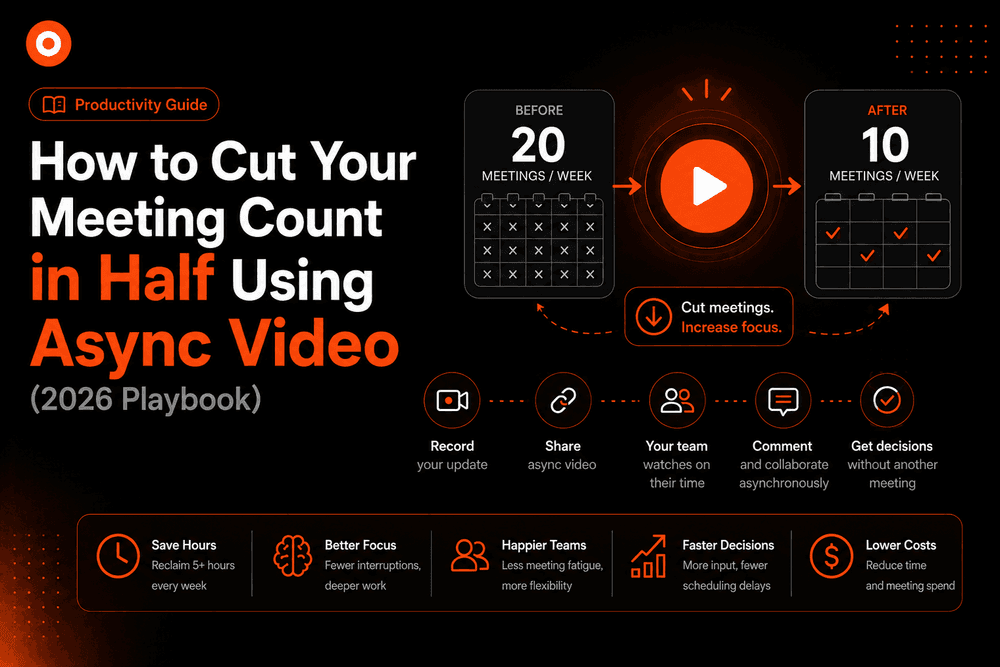
Async video solves it. Teams that shift status updates, project reviews, and walkthroughs to recorded video consistently report 20-30% more deep focus time and 8+ hours saved per person per week. Here is the exact playbook to do it.
First: Understand Why Most Meetings Happen
Meetings default to real-time because real-time is familiar - not because it is the right tool. When you audit your calendar honestly, most meetings fall into one of these categories:
| Meeting Type | Share of Calendar | Async-Replaceable? |
|---|---|---|
| Status updates / standups | ~30% | ? Almost always |
| Project reviews / demos | ~20% | ? Usually |
| One-way information shares | ~15% | ? Always |
| Decision-making discussions | ~20% | ?? Sometimes |
| Brainstorming / ideation | ~10% | ? Rarely |
| Relationship building / 1:1 | ~5% | ? Keep live |
Roughly 65% of the average meeting calendar is async-replaceable without losing any quality of outcome. The remaining 35% - real decisions, real brainstorming, relationship maintenance - stays live.
The 5 Meetings to Replace First
Start with the easiest wins. These five meeting types replace cleanly with almost zero pushback:
1. Weekly Status Updates
A 15-person standup uses 3.75 hours of collective time. Most of that information is only relevant to 2-3 people. Replace it with a 3-minute async video: what got done, what is next, any blockers.
How to record it: Screen share your project board or doc, walk through it while narrating. Done in 3 minutes. People watch on their own time, skip what is not relevant to them.
2. Sprint Reviews / Demo Days
Engineers and designers spending 90 minutes in a sync review is expensive. Record the demo - screen + voice walking through what shipped - and share the link. Stakeholders watch it, leave timestamped comments, and the async thread often produces better feedback than a live session where only the most vocal people speak.
3. Design and Code Walkthrough Requests
"Can we jump on a quick call so I can walk you through this?" Replace with: record the walkthrough, share the link. The viewer can pause, rewind, and watch at 1.5x. The AI transcript makes every decision searchable six months later.
4. Project Kickoffs (Information-Dense)
New project context dumps - timelines, scope, stakeholder map, technical decisions - are hard to absorb in real time. A recorded kickoff lets people pause when something needs a Google, rewatch the parts they missed, and share it with teammates who join later.
5. Customer or Investor Updates
Recurring updates to customers or investors are almost always one-directional. Record a polished 5-minute video instead of scheduling 30 minutes for something that has no real back-and-forth.
How to Introduce Async Video to Your Team
The biggest obstacle is habit, not technology. People default to "let's jump on a call" because it is familiar.
Step 1 - Start with yourself. For two weeks, every time you would have said "can we hop on a call?", record a video instead. Your team will notice and mirror.
Step 2 - Create one no-meeting morning per week. Block 9am-12pm on Tuesday (or whatever fits) as a calendar-protected deep work window. Any standup or update that would have happened there gets moved to async video.
Step 3 - Establish a clear decision rule. Write it down and share it:
- "If it's information-sharing, record a video. If it requires a real-time decision or genuine brainstorm, keep it live."
Teams with an explicit rule convert much faster than teams operating on individual judgment.
Step 4 - Make async video searchable. This is the step most teams miss. A video that lives in Slack and scrolls away within a week creates no lasting value. Zenrecap's AI transcripts make every recording searchable - both within the video and across your library. Decisions made in an async video three months ago are findable in seconds.
What Async Video Cannot Replace
Be honest about the limits or your team will resist the whole approach:
- Real decisions with genuine disagreement - async discussions around hard choices tend to stall. A 30-minute live conversation resolves what 3 days of async back-and-forth cannot.
- Emotional conversations - performance feedback, difficult news, sensitive topics. These need a face and real-time response.
- Genuine brainstorming - the generative energy of a live whiteboard session is not replicated asynchronously.
- Relationship building - new team members, new clients, cross-functional trust. Invest live time here.
Measuring the Shift
Track these numbers before and after the transition, even informally:
- Hours in meetings per week (per person)
- Unread notifications at start of day (an async culture reduces cognitive load here too)
- Self-reported deep work time - even a 5-question weekly poll works
- Time from question to answer - async video with AI transcripts often answers questions faster than booking a meeting, once the library exists
The Compounding Effect
An async video recorded today answers a question today, next week, and a year from now. A meeting held today answers a question today - and that's it.
Teams that have been building async libraries for 6-12 months report that a significant portion of their inbound "can we chat?" requests get deflected by sending a link to a relevant existing recording. The library pays dividends indefinitely.
Start building yours today. Install Zenrecap free, pick your next status update, record it instead of scheduling it, and send the link.